

PanelAlpha continues to challenge the idea that powerful hosting platforms have to be as difficult to manage as the industry has long accepted. Version 1.9.0 delivers on that promise with two major additions aimed at modern WordPress development practices: Git repository integration and WordPress MCP support.
This release is especially relevant for hosting providers, agencies, and developers who want to bring WordPress closer to the tools they already use. PanelAlpha v1.9.0 introduces a more structured deployment path through Git, and prepares WordPress environments for AI-assisted work through the Model Context Protocol. Together, these changes make PanelAlpha more useful for technical users while keeping the experience simple enough for everyday site management.
Git repository integration
One of the key new functionalities in PanelAlpha v1.9.0 is Git repository integration for WordPress instances.
What you can do with Git integration:
- Connect WordPress sites to repositories
- Select deployment branches
- Pull and push changes
- Enable auto-deploy with webhooks
- Track deployments and commits
Users can now connect a WordPress site to a Git repository directly from the Client Area. The integration focuses on the core actions needed in day-to-day development tasks: connecting a repository, selecting a branch, pulling changes, pushing changes, and enabling automatic deployments through repository webhooks.
This gives developers and agencies a more organized approach to managing WordPress code. Instead of relying only on manual file uploads or disconnected deployment routines, teams can bring repository-based actions closer to the hosting panel itself. A site can now be linked with a repository, updated from a selected branch, and deployed in a more transparent way.
The Client Area also displays the last deployed commit and a deployment log, helping users understand which version of the code is currently running and when changes were applied. That extra bit of visibility is especially useful when multiple people work on the same project or when teams need a clearer history of updates applied to a production site.
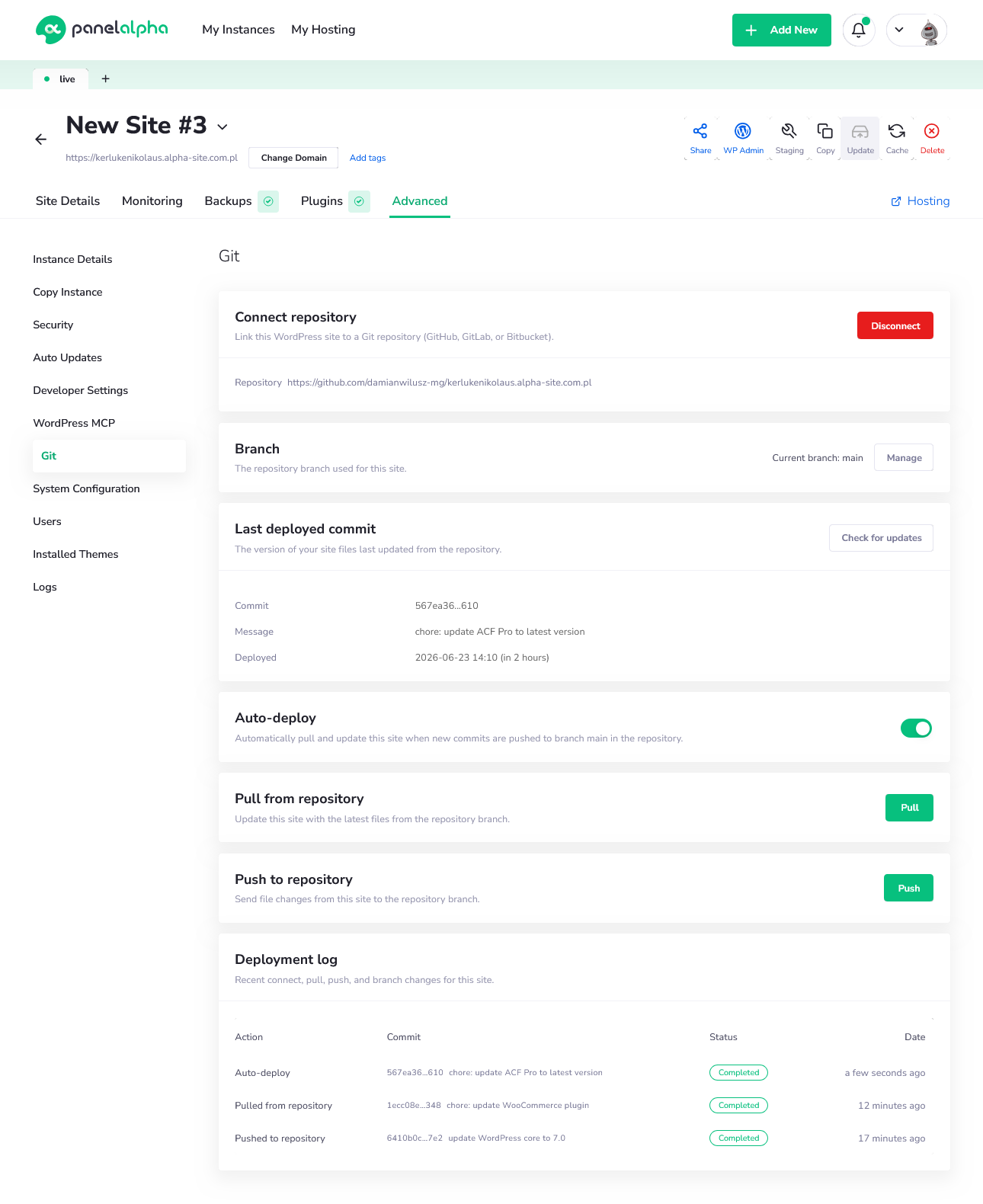
Built for teams that manage WordPress like software.
Git support is particularly valuable for users who treat WordPress projects as structured software projects rather than isolated websites. Agencies often need repeatable deployment processes, developers need branch-based workflows, and hosting providers want to offer a more professional experience to customers who expect modern development tools.
PanelAlpha v1.9.0 brings those needs closer to the WordPress instance view. Developers can pull the latest changes from a repository branch, push updates back when needed, and use auto-deploy to update the site when new commits are pushed to the connected branch.
Key takeaway:
Git integration helps agencies and developers manage WordPress projects using the same structured workflows they already apply to software development.
The current feature set prioritizes the essentials. Deployments focus on WordPress file synchronization, repository access is handled through HTTPS and Personal Access Tokens, and auto-deploy depends on webhook configuration on the repository side. SSH support is not part of this first release, but the foundation is now in place for a Git-based development process inside PanelAlpha.
For hosting companies, this is also a product value improvement. Git integration gives technical customers another reason to manage WordPress sites from the Client Area instead of building their own external process around the hosting environment.
WordPress MCP support
The second major feature in PanelAlpha v1.9.0 is the new WordPress MCP section available under the Advanced settings of the Client Area.
What MCP enables:
- AI-ready WordPress environments
- Standardized AI connections
- Simplified MCP setup
- Built-in endpoint management
- Official adapter installation support
Model Context Protocol, or MCP, is a standard designed to help AI tools, assistants, and automation platforms communicate with external systems in a more consistent way. In practice, it gives AI clients a structured interface for connecting with applications such as WordPress, instead of requiring a custom integration for every tool, use case, or assistant.
For WordPress hosting, this matters because AI is quickly moving beyond simple content generation. More teams are experimenting with agents and assistants that can support site maintenance, content operations, internal automation, development processes, and customer experiences. To make that practical, WordPress needs a safe and well-defined way to expose selected functionality to AI-powered tools.
PanelAlpha v1.9.0 introduces that layer directly from the Client Area. Users can enable or disable WordPress MCP for a selected instance, access the generated connection endpoint, copy the required configuration, and follow built-in connection instructions. The goal is to make MCP approachable without asking users to manually prepare every technical detail on their own.
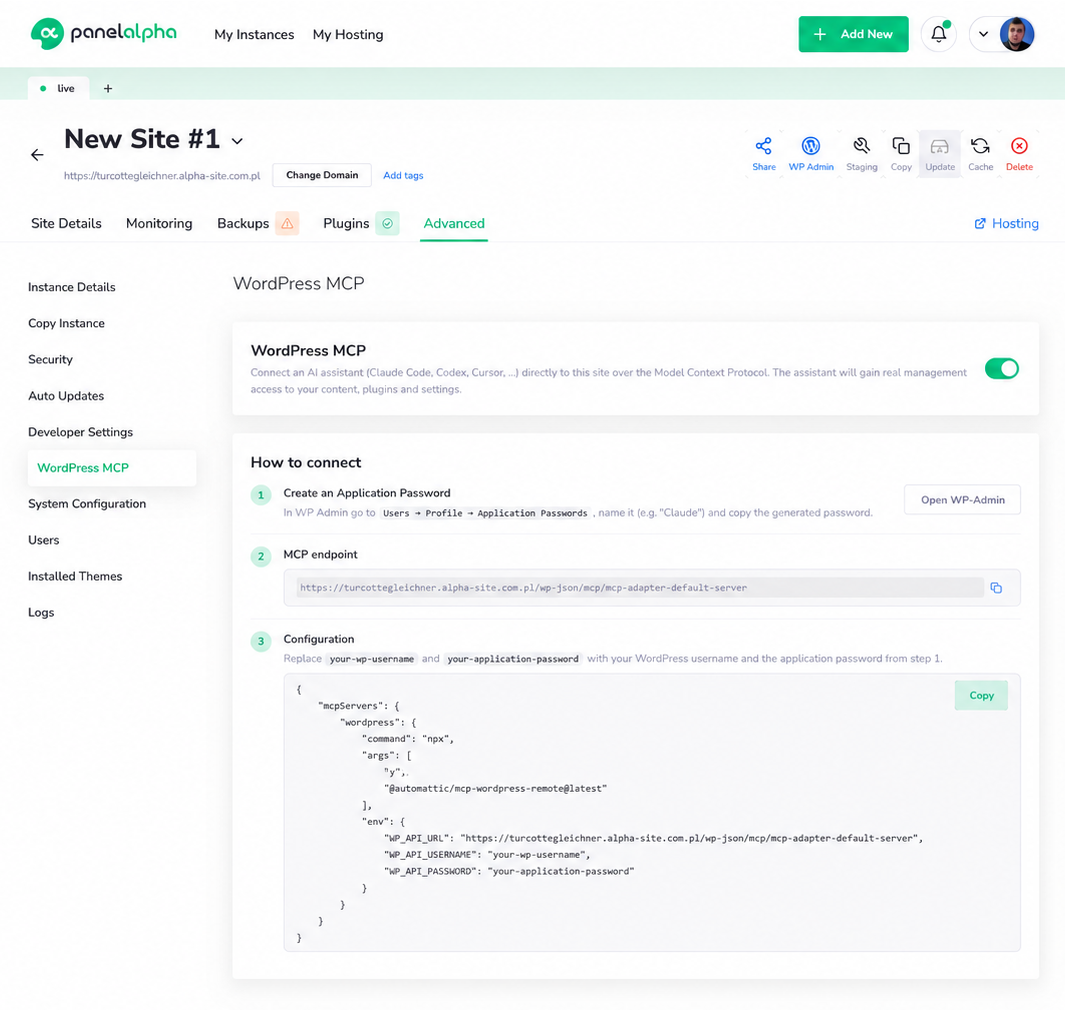
Preparing WordPress for the AI-native future.
For hosting providers and agencies, MCP is a step toward making WordPress an active part of AI-enabled strategies. With MCP enabled, a WordPress instance can be connected to compatible AI clients in a standardized way. That creates room for future operating models where assistants can help teams inspect site data, support content processes, automate selected actions, or build internal tools around WordPress without starting each integration from scratch.
This is important because the WordPress ecosystem is entering a phase where automation will increasingly depend on how well platforms expose their functionality to external AI systems. A hosting panel that supports this direction gives users more flexibility and helps providers prepare their services for the way websites will be managed in the coming years.
Key takeaway:
MCP support gives hosting providers and agencies a practical way to prepare WordPress environments for AI operations, automation, and future integrations.
PanelAlpha keeps this process controlled from the panel level. Users can see the MCP status, manage availability, copy connection details, and receive warnings if the endpoint is not accessible. When MCP is enabled, PanelAlpha also handles the installation flow for the official WordPress MCP Adapter, including activation and connection verification. That eliminates much of the onboarding effort and makes the feature easier to test, use, and manage in real hosting environments.
More power inside the Client Area
Both Git repository integration and WordPress MCP follow the same product direction: PanelAlpha should give users more advanced capabilities without forcing them to leave the control panel for every important action.
Key takeaway:
The Client Area is becoming more than a place for basic WordPress operations. It’s also becoming a workspace for development, automation, AI-readiness, and more effective site management.
Users can control their sites, connect modern tools, configure advanced integrations, and keep visibility over what is happening with their instances from a single environment.
For hosting providers and agencies, that means more value delivered through the platform. For developers, it means fewer disconnected steps between code, deployment, and site management. For end users, it means a more capable WordPress experience that keeps up with how modern websites are built and maintained.
Built for the next stage of WordPress hosting
What modern WordPress hosting is expected to deliver today looks very different than it did just a few years ago. Customers increasingly expect automation, developers rely on more sophisticated workflows, and platforms need to support both without making the experience harder to manage.
Version 1.9.0 brings that vision another step further. From major additions to smaller improvements across the platform, you’ll find a closer look at everything included in this release in the changelog.




Comments