

The latest PanelAlpha releases include this month’s nginx and PHP security fixes:
- Engine 2.3.1, Engine 1.0.23.5 and Multi Server 1.9.8.6 are available now.
- The new Single Server 2.0 beta includes the same fixes from the first install.
Below, we’ll walk you through what changed, which parts of your setup are affected and how to update.
If an update applies to your setup, we recommend installing it as soon as you can.
What was fixed in nginx
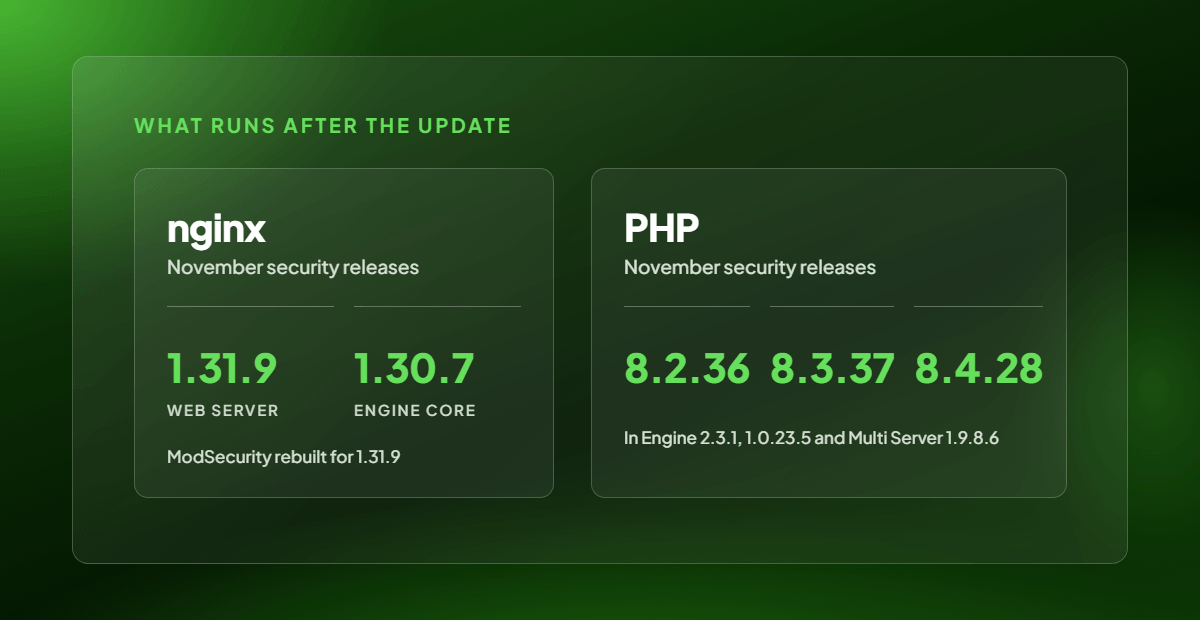
When someone opens one of your sites or the panel, their request goes through nginx, the web server in front of both. The November releases, nginx 1.31.9 and nginx 1.30.7, fix ten vulnerabilities in the nginx versions we previously shipped.
Most of the fixes are for the way nginx handles HTTP/2 and HTTP/3 connections and for its built-in DNS resolver. One fix addresses the way nginx reads a request body over TLS 1.3. The most serious issues can corrupt memory in an nginx worker process. Others can cause a worker to hang or crash, leaving sites offline until the worker restarts.
PanelAlpha serves sites over HTTP/2, so these fixes matter for every server where nginx is the web server or sits in front of it.
Both engines now use nginx 1.31.9 for the web server in front of your sites and nginx 1.30.7 inside the engine core. ModSecurity, the web application firewall, runs as an nginx module. nginx can only load the module if it was built for that exact version. We rebuilt it for 1.31.9, so your firewall rules and exclusions keep working after the update.
What was fixed in PHP
The November PHP releases are 8.2.36, 8.3.37 and 8.4.28. They follow the critical PHP2Shell fixes we covered in our October PanelAlpha security update.
PHP 8.4.28 fixes 14 vulnerabilities, 8.3.37 fixes 13 and 8.2.36 fixes 12. Here are the issues most relevant to hosting servers:
- Sessions. Two flaws can lead to remote code execution. One of them is CVE-2026-115560, which we blocked in October by switching off
session.upload_progress. PHP now includes a fix for it. - PHP-FPM. The fixes cover request smuggling, a use-after-free that could let a local user gain more privileges, and unescaped output on the status page.
- Date. A use-after-free in the timezone cache can lead to remote code execution.
- Phar, SOAP and PHP-CGI. The fixes cover a signature check that could be bypassed, memory errors and an information leak.
PHP 8.1 and older no longer receive official fixes. If any of your sites still use those, move them to PHP 8.2 or newer to get the fixes. The full list is in the PHP 8 changelog.
Your sites pick up the PHP fixes when their containers are recreated using the new image. The Engine 1.0.23.5 and Multi Server 1.9.8.6 updates do that for you. If you’re on Engine 2.x, there’s one extra command to run, which we cover below.
How to apply the security updates
The versions below are ready. Start with a backup, then follow the steps for the products you use.
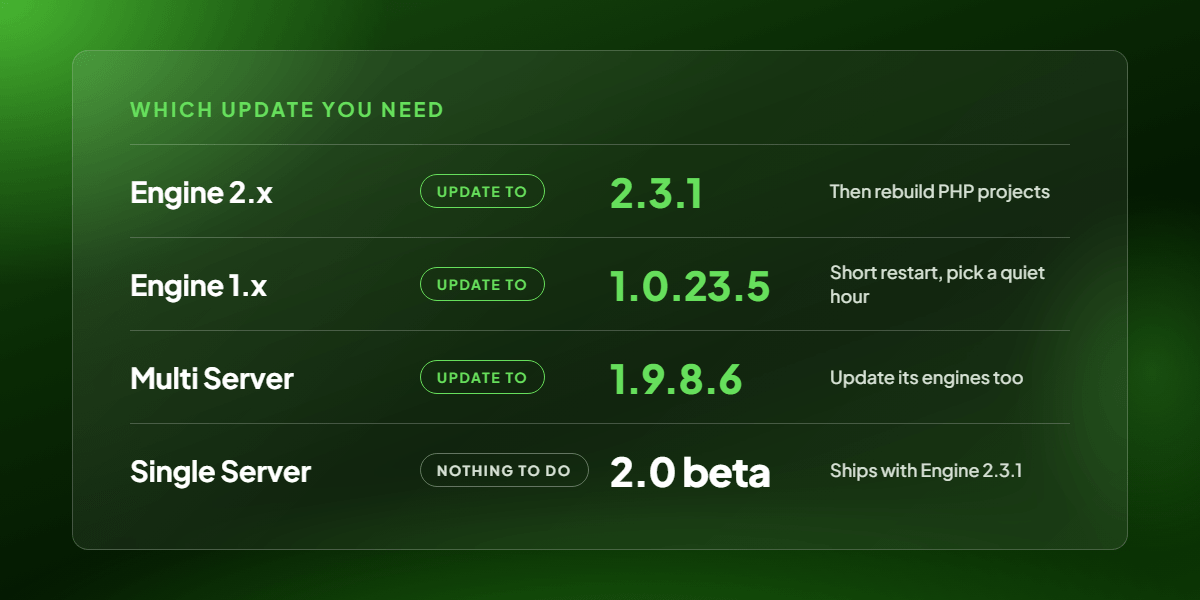
PanelAlpha Engine 2.x → update to v2.3.1
This release brings nginx 1.31.9 to the web server image and nginx 1.30.7 to the engine core. We’ve also rebuilt the ModSecurity module for the new web server version. Every engine image is tagged v2.3.1.
The new image for traditional PHP hosting projects, including WordPress sites, comes with PHP 8.2.36, 8.3.37 and 8.4.28. New projects use it from the start. Existing PHP hosting projects only pick up the new PHP versions when you rebuild them, and updating the engine leaves that step to you. After the update, ask your assistant “Rebuild every PHP hosting project on this PanelAlpha Engine.”, or run pae project:rebuild --project=<project> on the VPS for each of them. Each site will restart briefly while its container is recreated. Apps you’ve deployed from a Git repository keep running on their own images and are unaffected by this PHP image change.
To update an existing Engine installation, run the install command again on your VPS. When it’s finished, you’ll see PanelAlpha engine has been successfully updated!. Your sites keep running during the update. Version 2.3.1 also adds system projects and fixes PHP limits, WordPress imports and FTP backups.
UPDATE COMMAND
curl --proto '=https' -fsSL https://get.panelalpha.com/engine | shYou can find the full details in the Engine 2.x update guide and the changelog.
PanelAlpha Engine 1.x → update to v1.0.23.5
Sites using the Nginx and Nginx Proxy web servers move to nginx 1.31.9, and we’ve rebuilt the ModSecurity module for that version. Your sites’ PHP containers (PHP-FPM and PHP-FPM with Apache) and the engine core move to PHP 8.2.36, 8.3.37 and 8.4.28. The core also moves to nginx 1.30.7.
To update from the Control Panel, open the server’s Details tab and click Update Now. You can also connect as root and run the updater below. The update rebuilds every hosting account on the new images. Your sites will be briefly unavailable while the containers restart, so it’s best to choose a time when traffic is low.
UPDATE COMMAND
wget -N -P /opt/panelalpha https://license.panelalpha.com/engine-updater.sh
bash /opt/panelalpha/engine-updater.sh
See the Engine 1.x update guide for the complete procedure and recovery instructions.
PanelAlpha Multi Server → update to v1.9.8.6
The web server in front of the panel moves to nginx 1.31.9. We’ve also rebuilt the panel’s own containers (API, websocket, queue worker and cron) with PHP 8.2.36.
Back up your server and database, then connect to the panel server as root and run the command below. The installer will find your existing installation and update it.
UPDATE COMMAND
curl -fsSL https://get.panelalpha.com/app | shFor system requirements and troubleshooting, follow the Multi Server update guide.
PanelAlpha Single Server 2.0 beta → no update needed
Single Server 2.0 beta installs PanelAlpha Engine 2.3.1 as part of the panel setup. If you installed the beta, your server already has the nginx and PHP fixes above.
Important notes for your update
Back up first. For Engine 1.x and Multi Server, the simplest way to do this is to take a snapshot with your hosting provider. If the Engine 1.x update fails, the updater won’t roll back automatically.
Engine 2.x needs a rebuild for PHP. The nginx fixes take effect when you update the engine. Existing PHP hosting projects keep their current PHP version until you rebuild each one.
Multi Server and its engines are separate updates. When you update the panel to 1.9.8.6, the Engine 1.x servers it manages still need their own update. Update both so the fixes reach the sites you host.
Check that everything still works
Once you’ve updated, open a few of your sites and sign in to the panel as both an admin and a client. On Engine 1.x, check that the Control Panel no longer shows “This server is outdated”. Finish by checking the error logs, since problems can show up there even when a page loads normally.
Questions about the update?
If you’re unsure which update you need or would like us to take a look at your setup with you, drop us a note on Discord. You’ll find our team and other PanelAlpha users there.
Join us on Discord →


Comments